GitDash
DocsAPI playgroundGitHub
Open GitDash
GitDash Docsv4.7.1
GitHub API playground
  • Introduction
  • Quick start
  • Deployment
  • Configuration
  • Auth modes
  • Access control
  • Caching & rate limits
  • Security model
  • Data sources
  • Feature overview
  • Repositories
  • Repository · Overview
  • Repository · Workflows
  • Repository · Pull requests
  • Repository · Team
  • Repository · Issues
  • Repository · Security
  • Repository · Audit trail
  • Workflow detail
  • Alerts
  • Team insights
  • Contributor & 1:1 prep
  • Cost
  • Reports
  • Org overview & health
  • Settings
  • AI insights
  • Metrics Reference
  • DORA 4 Keys
  • PR Cycle Time
  • PR Lifecycle Health
  • Workflow Overview
  • Performance Tab
  • Reliability Tab
  • Team & People
  • CI & Alert Metrics
  • API Reference
  • FAQ & Troubleshooting
  • Contributing
  • Release Notes
  • Data & privacy
GitHub RepositoryReport an Issue
GitDash Docs

Repositories

/
Needs attentionFilters and sortPinned repositoriesKeyboard

The home screen answers “what is wrong right now?” before listing everything. Pick the organization (or your personal account) in the sidebar switcher and a time range of 24 hours, 7, 30 or 90 days.
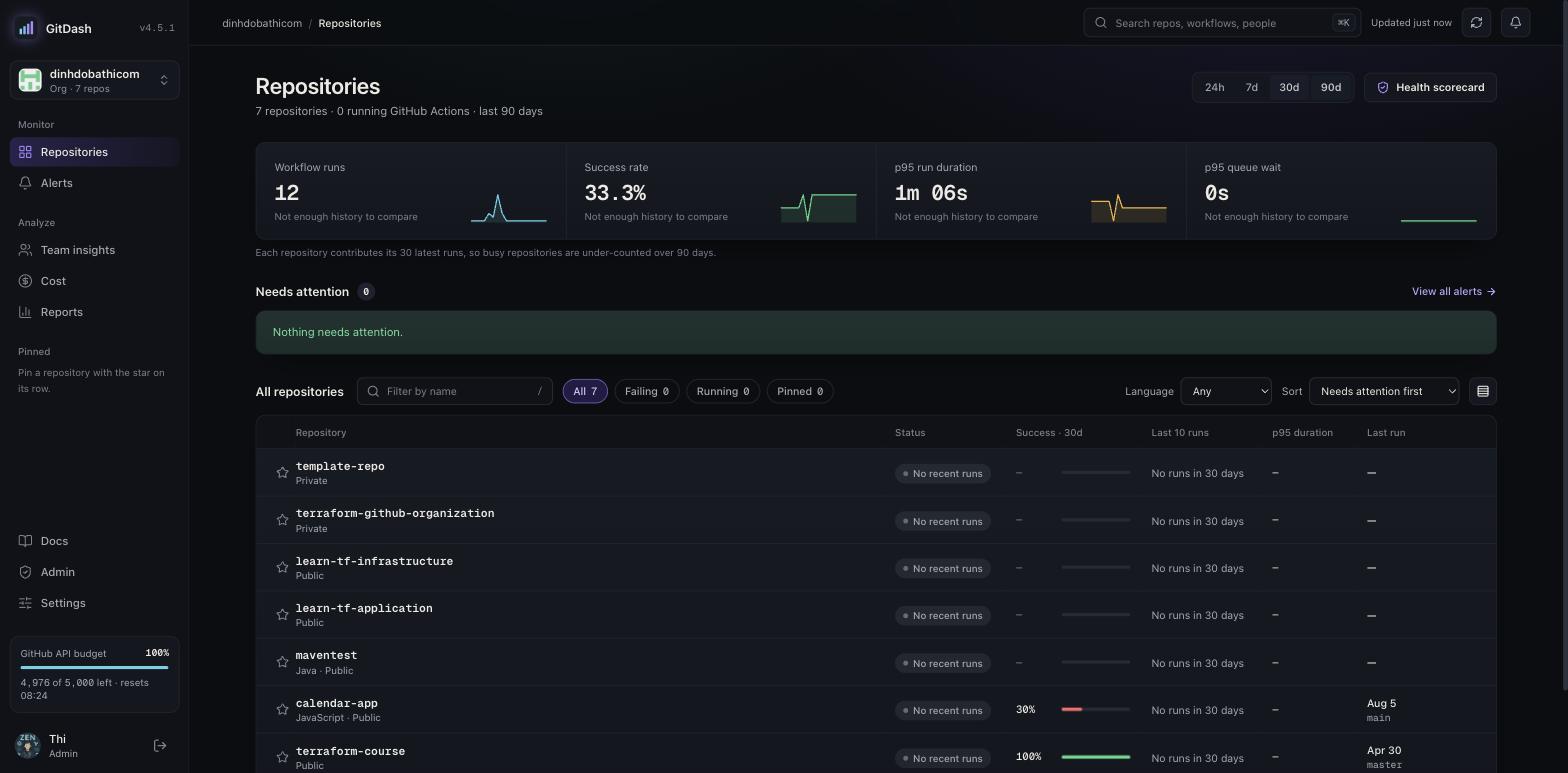
Repositories home
PartWhat it shows
Summary stripWorkflow runs, success rate, p95 run duration and p95 queue wait, each compared with the previous period.
Needs attentionFiring alerts and failing repositories, most urgent first.
All repositoriesStatus, success rate, the last 10 runs, p95 duration and last run. Filter by name, status (failing, running, pinned) and language; sort, and switch row density.
Health scorecardOpens the organization's health ranking (see Org overview & health scorecard).
Keyboard: / focuses the filter, ↑/↓ move, ↵ opens and p pins; ? lists the shortcuts. Pinned repositories also appear in the sidebar.
PreviousFeature overviewNextRepository · Overview

GitDash v4.7.1 — GitHub Actions Dashboard

Open source on GitHubData & privacyReport an issue